· Product · 7 min read
Cunav isn't just a Ticketing System — It's Workflow-Powered Customer Communication
Cunav looks like a support desk from the outside — queues, tickets, replies. Underneath, every one of those is a real workflow on the Advanced Workflow Engine, which is why it can do things a ticketing tool never could — from AI-routed tickets to a conversation your own AI agent can have with it directly.
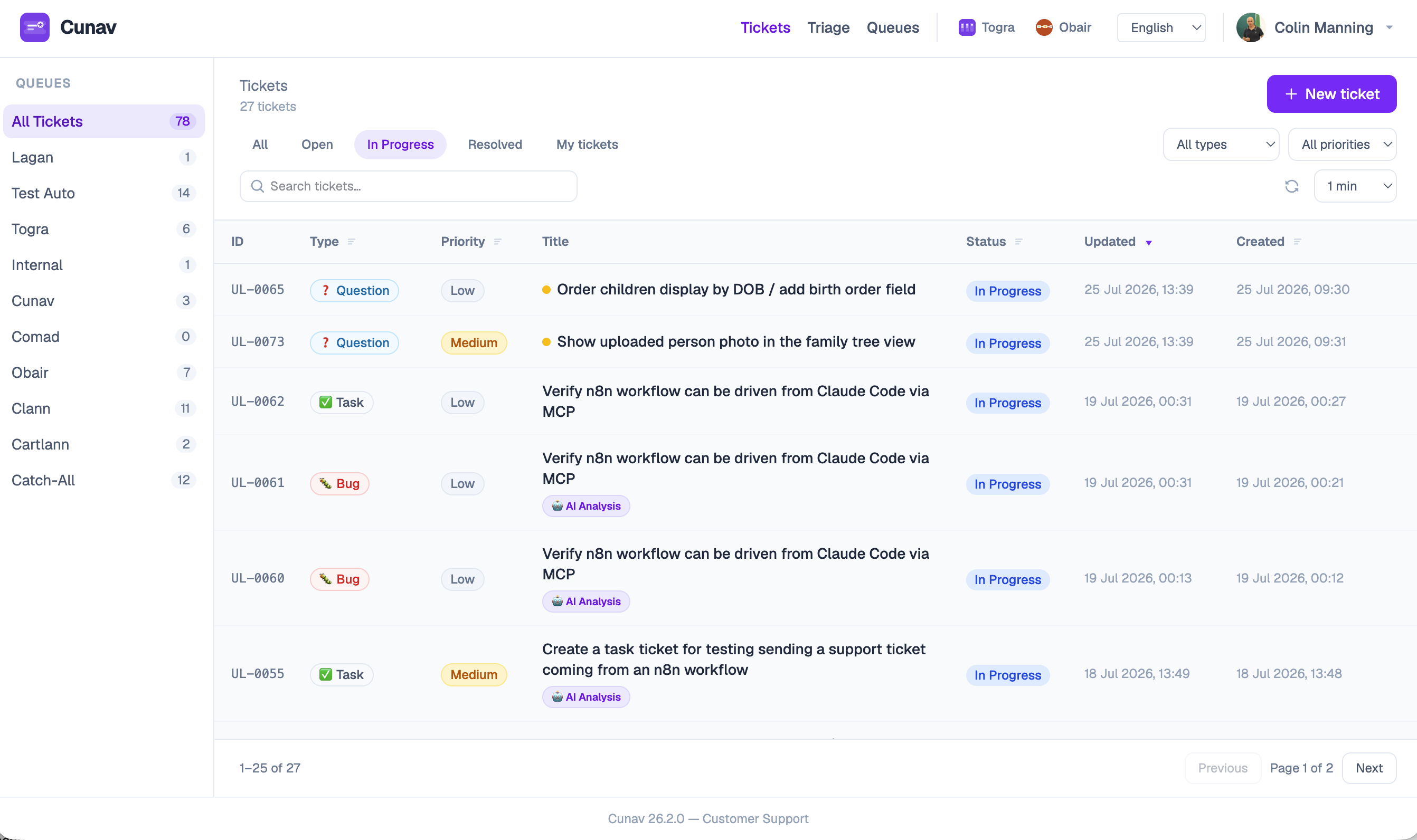
Call Cunav a “support ticketing system” and you’d be right, as far as it goes. There are queues. There are tickets. Someone reports a problem, someone else picks it up, it gets resolved. Nothing about that surface is unusual.
What’s underneath it is. A Cunav queue is not a special support-desk data structure — it’s an AWE Job. A ticket is not a special ticket record — it’s an AWE Workflow. Every capability of the Advanced Workflow Engine — typed tasks, AI-driven decisions, automated steps, full audit history — is available to a “support ticket” because a support ticket already is one of those things.
That distinction isn’t academic. It’s why Cunav can do four things in this post that a bought-off-the-shelf ticketing tool can’t: triage tickets with AI before a person opens them, catch duplicates automatically, hold a real two-way conversation with a customer over email without anyone touching an inbox, and let an AI agent — yours, not just ours — file and check tickets on a customer’s behalf. Support turns out to be just one of the conversations a business has with the people it serves. Once it’s a workflow instead of a fixed ticketing form, it’s not the only one.
AI-Enabled Queues: the part that gets people’s attention
Flip a flag on any queue — ai_enabled — and every ticket that lands in it gets read and judged automatically, before or alongside a person looking at it. Not keyword matching. The ticket text is read for what it actually says, and Cunav proposes a next step with a confidence score attached.
Two things make that useful in practice rather than gimmicky:
It’s confidence-gated, per queue, per outcome. Nothing acts on its own below a threshold you set. Below it, a ticket just waits for a human, same as always. Above it, Cunav can act on its own proposal. You decide where that line sits, and you can set it differently for a “general questions” queue than a “billing disputes” queue.
Every proposal is logged, whether or not it was acted on. Confidence numbers that never get checked against reality are just vibes. Cunav records the proposal, the confidence, whether it executed, and — via a simple 👍/👎 on the ticket — whether a human found it actually right. That’s what lets the thresholds get better over time instead of staying a guess forever.
Use case one: routing straight to the team that owns it
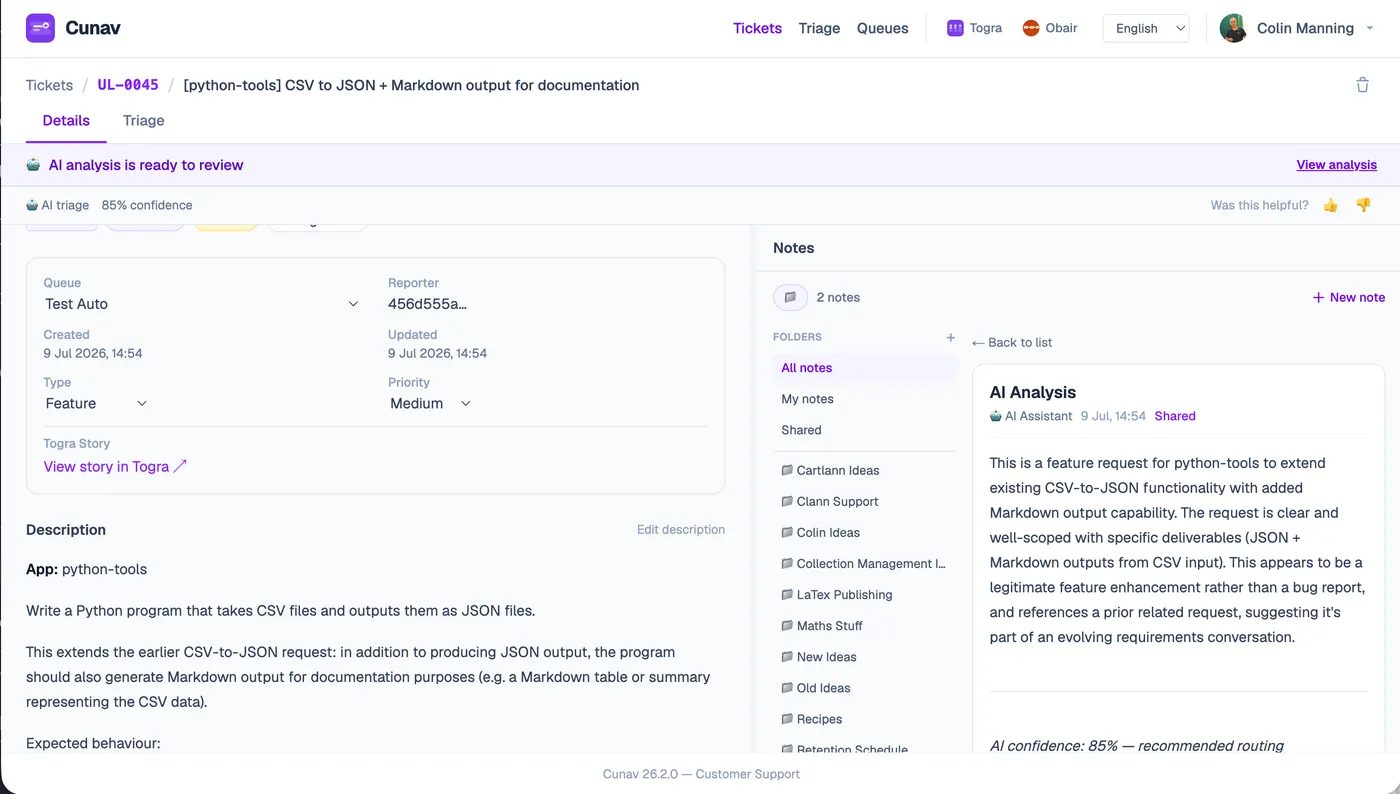
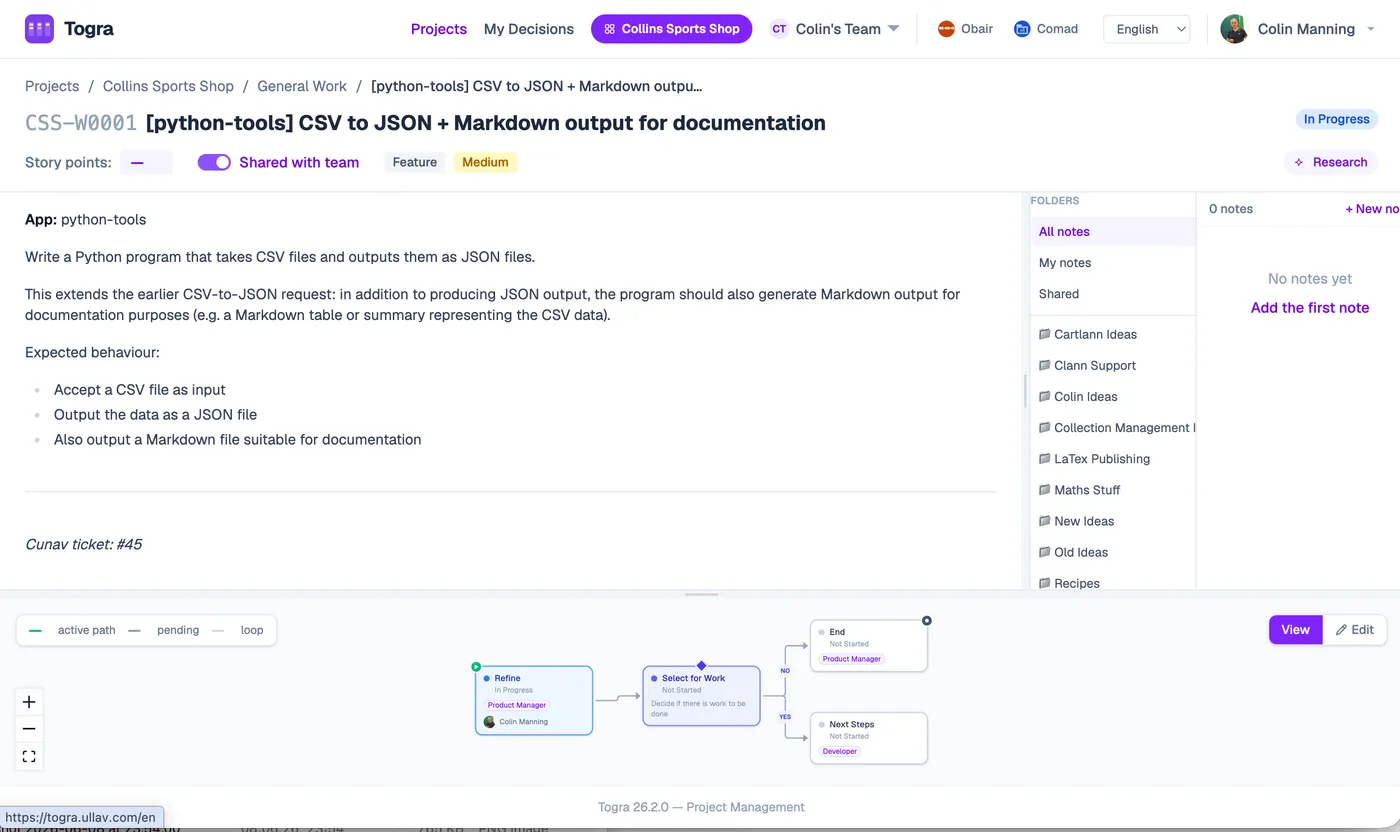
The most immediately useful thing an AI-enabled queue can do is decide a ticket is real, scoped, actionable work — and create the matching Togra story itself, linked back to the ticket, on the right project.
That’s not a label. It’s the actual handoff from support to delivery happening without a person copying anything across by hand. A customer describes a problem; if it clears the bar, the team that owns that part of the product has a scheduled piece of work waiting for them, with the original report attached, before anyone in triage has had their morning coffee.
Use case two: catching duplicates before they become noise
The second thing an AI-enabled queue does is check a new ticket against what’s already open, and flag it when it’s the same issue arriving a second (or fifth) time.
This is a smaller-sounding feature that solves a bigger problem than it looks like. Every support team loses real hours to the same bug being independently reported, triaged, and half-investigated multiple times before someone notices it’s one issue wearing several ticket numbers. Cunav catches that at the door instead of after the fact — the duplicate gets flagged and linked to the original, so the team works the issue once, not four times.
Both of these are the same underlying mechanism doing two different jobs: an AI-enabled queue proposing an outcome, at a confidence you control, logged either way. Routing and duplicate detection are the two use cases live today — the architecture doesn’t stop at two.
Talking to the people who already work here
Support doesn’t happen in a vacuum — it happens between people who already have an identity on the Ullav Platform. Anyone on your team who touches Cunav is the same person, with the same login, they are in Togra, in Obair, anywhere else on the platform — identity and team membership come from Ullav User Management, once, not re-created per app.
That matters more than it sounds. Which queues someone can see, which tickets they can act on, whether they can enable AI on a queue at all — that’s team-scoped access control inherited from the same place every other product on the platform gets it. No separate support-tool user database to keep in sync, no second place permissions can drift out of date.
Talking to the people who don’t
Internal identity solves half the problem. The other half is the actual customer — who has never heard of Ullav User Management and shouldn’t need to.
Cunav’s answer is real two-way email. A ticket update goes out as an email, the way any support tool sends notifications — but a reply to that email isn’t a dead end. It comes back into the ticket thread automatically, as if the customer had typed it straight into Cunav. From the customer’s side, it’s just an email conversation. From the team’s side, it’s the same ticket, same workflow, same history, no separate inbox to babysit and reconcile by hand.
Built for the people using an AI agent instead of a browser
The last piece is the one that says the most about where this is heading: Cunav exposes an MCP server, so an AI agent — Claude Code, Codex, ChatGPT, or anything else that speaks MCP — can act on it directly, without a person ever opening the Cunav UI.
Three tools, deliberately small in scope:
report_issue— file a new ticket from a natural-language description, no Cunav login requiredcheck_my_tickets— list a reporter’s open tickets by emailget_ticket— pull the full detail of a specific ticket by reference (ULLAV-42,ullav-42, or just42)
In practice, that means a developer debugging something in their own AI coding assistant can say “file a ticket for this” or “what’s the status of ULLAV-42” and get an answer without a context switch — the agent is talking to the same workflow engine a person would use, through the same access model, with its own dedicated service identity rather than borrowing anyone’s login.
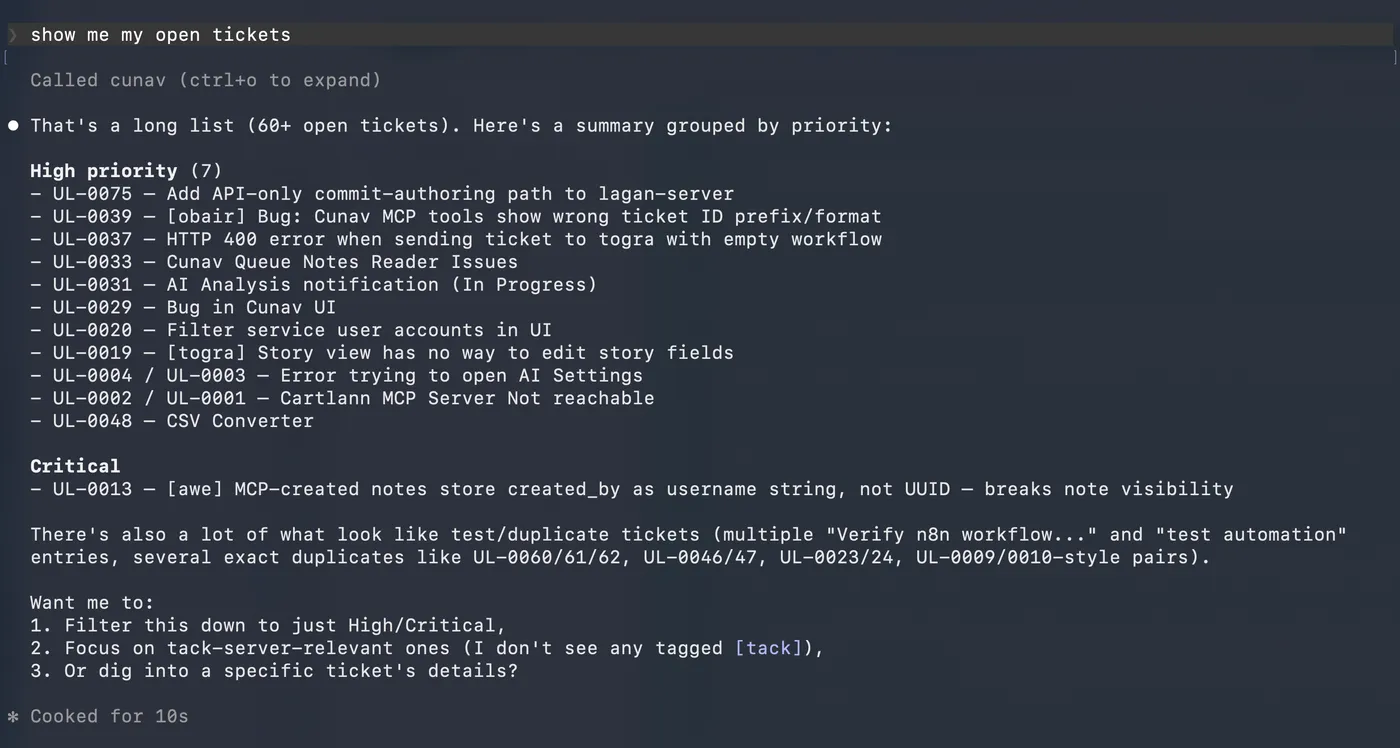
Worth noticing in that screenshot: nobody asked Claude to look for duplicates — it spotted the pattern on its own, from a plain “show me my open tickets.” That’s the same problem the duplicate-detection outcome type solves systematically, at the point a ticket is created rather than after 60 have piled up.
Why this is the whole point
None of this is a support-desk feature list. It’s what happens when “customer communication” is built as workflows on a real engine instead of as a fixed ticketing form with a few toggles. Support is the use case that’s finished and demoable today — routing, duplicate detection, two-way email, AI-agent access, all live. It is not the only communication a business has with the people it serves, and because it’s workflows underneath rather than a rigid product, it doesn’t have to be.
Want to see it running rather than read about it? Get in touch — we’ll walk you through it live.